个人使用的工具部署记录
Alist
Docker
Systemd
按照alist官方文档下载二进制包,部署并运行。 编辑文件 /etc/systemd/system/alist.service , 写入内容:
service
[Unit]
Description=alist server
After=network-online.target
Before=nss-lookup.target
Wants=network-online.target nss-lookup.target

[Service]
WorkingDirectory=/home/arlen/tools/
ExecStart=/home/arlen/tools/alist server
ExecStop=/bin/kill -SIGINT $MAINPID
User=arlen

[Install]
WantedBy=multi-user.target
docker
shell
mkdir -p /etc/alist/
# 以下两种方式二选一即可
# 使用官方的镜像仓库
docker run -d -v /etc/alist/:/opt/alist/data/ -p 5244:5244 -e PUID=0 -e PGID=0 -e UMASK=022 --name="alist" xhofe/alist:latest
# 使用内部私人的镜像仓库,需要配置/etc/docker/daemon.json中的insecure-registries,增加172.20.16.139:5000
docker run -d -v /etc/alist/:/opt/alist/data/ -p 5244:5244 -e PUID=0 -e PGID=0 -e UMASK=022 --name="alist" 172.20.16.139:5000/alist:latest
# set admin password
docker exec -it alist ./alist admin set <your password>
配置
访问 机器ip的5244端口,使用admin和上一步骤设置的密码登录。 默认进入alist主页,正下方有 管理 按钮,点击进入管理界面。
配置对象存储
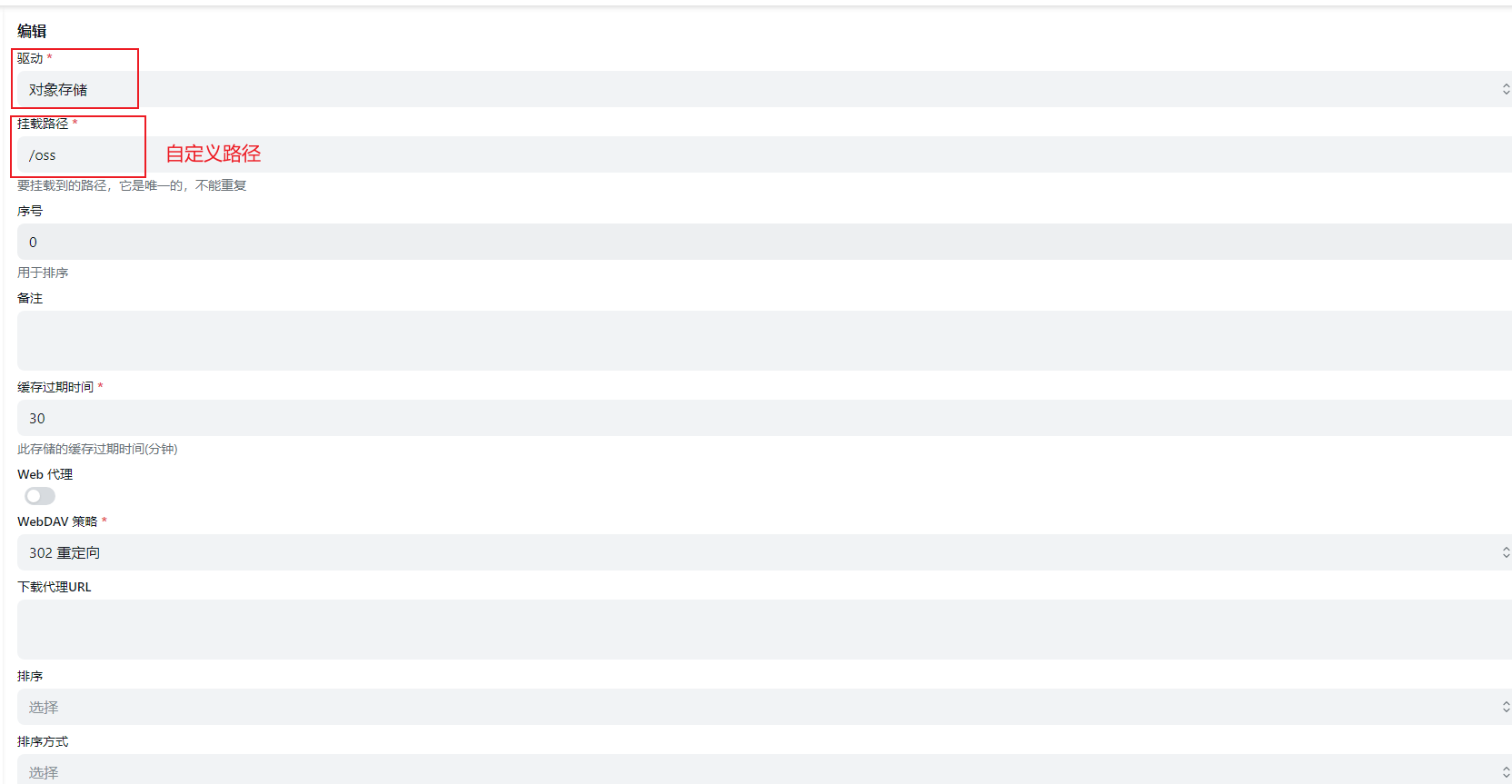
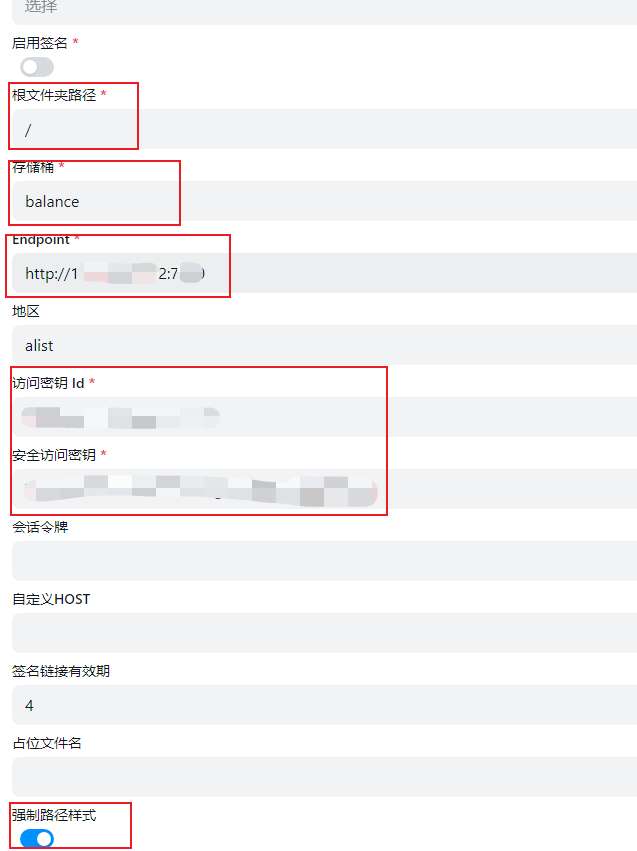
在管理界面中的存储中添加存储,如下图所示: 驱动选择为对象存储; 挂载路径自定义即可; 根文件夹路径无需改变; 存储桶填写对象存储的桶名称; Endpoint填写对象存储的网关地址,格式为http://ip:port ; 访问密钥id和安全访问密钥分别填写对象存储的用户的访问密钥和安全密钥; 打开强制路径样式; 其余都为默认设置,不需要改动,然后保存;
使用
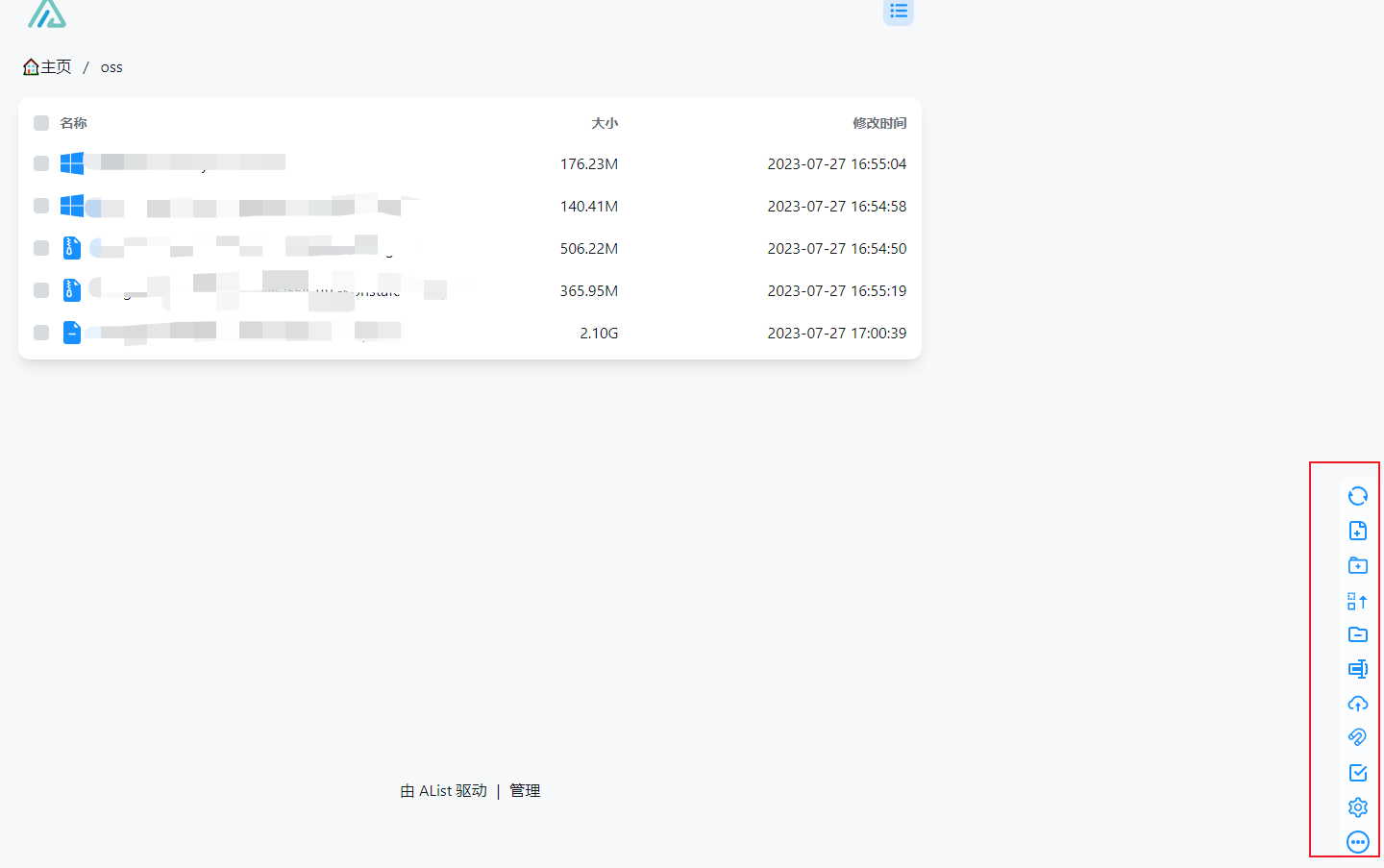
配置存储后回到主页,就能看到配置的存储;以挂载路径显示。右下角有一系列操作按钮,包括新建、上传以及删除等操作。 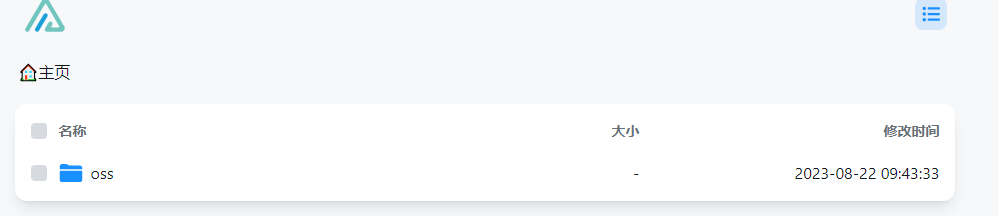
Swagger
Docker Compose deploy
yaml
services:
  swagger-editor:
    image: swaggerapi/swagger-editor:latest
    ports:
      - 4567:8080
    volumes:
      - /home/arlen/Documents/swagger/:/workspace/
    restart: unless-stopped
    environment:
      SWAGGER_FILE: "/workspace/group.json"
  swagger-ui:
    image: swaggerapi/swagger-ui:v5.18.2
    ports:
      - 8080:8080
    volumes:
      - /home/arlen/Documents/swagger/:/usr/share/nginx/html/workspace/
    restart: unless-stopped
    environment:
      SWAGGER_JSON_URL: "http://127.0.0.1:8080/workspace/openapi.json"
Deploy Single
Swagger Editor
bash
docker run -d -p 4567:8080 -v /home/arlen/Documents/swagger/:/workspace/ -e SWAGGER_FILE=/workspace/group.json --name=swagger-editor swaggerapi/swagger-editor:latestSwagger UI
bash
docker run -d -p 8080:8080 -e SWAGGER_JSON_URL=http://127.0.0.1:8080/workspace/openapi.json -v /home/arlen/Documents/swagger/:/usr/share/nginx/html/workspace/ --name=swagger-ui swaggerapi/swagger-ui:v5.18.2命令行工具
tldr
Too Long; Didn't Read; 简化了man命令输出,只列出常用的几个命令参数以及说明;
github: https://github.com/tldr-pages/tldr
hstr
记录终端执行过的历史命令, 并提供快速查找功能。
github: https://github.com/dvorka/hstr
mdbook
渲染markdown文件为web站点,并以书籍目录的方式展示相关联的markdown文件。 使用book.toml来描述整个项目。
textfile
| book_dir
| -- book.toml 项目描述文件
| -- book 生成的站点文件
| -- src  markdown文件根目录
| -- | SUMMARY.md 目录文件
| -- | other markdown files
bash
# 当前目录为根目录, 渲染站点并展示,监听端口8912, 允许任意来源ip的连接
mdbook serve ./ -p 8912 -n 0.0.0.0
python
#!/usr/bin/python3
# -*- encoding: UTF-8 -*-
# Author: arlen
# filename: generate_summary.py
# usage: generate SUMMARY.md by scan all md files
"""
将该脚本放在mdbook目录结构中的src目录下, 执行python3 generate_summary.py
扫描脚本所在目录下的所有md文件以及文件夹, 文件夹必须要有一个与目录同名的md文件
例如目录 ./abcd ,需要一个文件 ./abcd.md
生成SUMMARY.md文件中内容,供mdbook程序使用
"""

import os

IGNORED_PREFIX = "_"
ALLOWED_FILE_SUFFIX = ["md"]
FILE_SEP = ".."
SOURCE_DIR = "src"
STATIC_DIR = "static"
SUMMARY_TEMPLATE_FILENAME = "SUMMARY.md"
SUMMARY_TEMPLATE = "# Summary"
LINK_TEMPLATE = "{prefix}- [{name}]({path})"
DIR_TEMPLATE = "{prefix}- {name}"


def get_md_files(current_path=None):
    if current_path is None:
        current_path = os.getcwd()
    file_list = {}
    for i in os.listdir(current_path):
        if i == STATIC_DIR:
            continue
        if i.startswith(IGNORED_PREFIX):
            continue
        if i == SUMMARY_TEMPLATE_FILENAME:
            continue
        i_path = os.path.join(current_path, i)
        if os.path.isdir(i_path):
            if not os.path.isfile("{}.md".format(i_path)):
                raise Exception("not exist the same name file{} with dir{}".format("{}.md".format(i_path), i_path))
            if i in file_list.keys():
                file_list[i]["child"] = get_md_files(i_path)
            else:
                file_list[i] = {"name": i, "path": i_path, "child": get_md_files(i_path)}
        if os.path.isfile(i_path):
            if not is_md_file(i_path):
                continue
            name = FILE_SEP.join(i.split(FILE_SEP)[:-1])
            if name in file_list.keys():
                file_list[name]["path"] = i_path
            else:
                file_list[name] = {"name": name, "path": i_path, "child": []}
    return file_list


def is_md_file(file_path):
    if file_path.split(FILE_SEP)[-1] in ALLOWED_FILE_SUFFIX:
        return True
    else:
        return False


def generate_summary_content(content: list, file_list, prefix=""):
    for f in file_list.values():
        content.append(LINK_TEMPLATE.format(prefix=prefix, name=f["name"], path=f["path"]))
        if f["child"]:
            content = generate_summary_content(content, f["child"], prefix="{}    ".format(prefix))
    return content


def write_summary_file(content: str, file_path):
    with open(file_path, "w") as f:
        f.write(content)


if __name__ == '__main__':
    import json

    wk_path = "../"
    src_path = os.path.join(wk_path)
    print("src path: ", os.path.abspath(src_path))
    file_list = get_md_files(src_path)
    print("file list: ", json.dumps(file_list))
    content = [SUMMARY_TEMPLATE]
    content = generate_summary_content(content, file_list)
    content_str = "\n".join(content)
    print("content: ", content_str)
    file_path = os.path.join(src_path, SUMMARY_TEMPLATE_FILENAME)
    print("will write file: ", file_path)
    write_summary_file(content_str, file_path)
    print("write summary complete")